
JavaScript 模块化七日谈
原文资源:
TIP
因为原网站的slide每次浏览都太慢了,大屏的过渡动画还花眼
原文作者黄玄,微信电影票前端工程师,前阿里巴巴前端工程师

Why Modular? WEB IS EVOLVING
- Web sites are turning into Web Apps
- Code complexity grows as the site gets bigger
- Highly decoupled JS files/modules is wanted
- Deployment wants optimized code in few HTTP calls
第一日 上古时期 Module? 从设计模式说起
最早,我们这么写代码
function foo(){
    //...
}
function bar(){
    //...
}
Global 被污染,很容易命名冲突
简单封装:Namespace 模式
var MYAPP = {
    foo: function(){},
    bar: function(){}
}

MYAPP.foo();- 减少 Global 上的变量数目
- 本质是对象,一点都不安全
匿名闭包 :IIFE 模式
var Module = (function(){
    var _private = "safe now";
    var foo = function(){
        console.log(_private)
    }

    return {
        foo: foo
    }
})()

Module.foo();
Module._private; // undefined
函数是 JavaScript 唯一的 Local Scope
再增强一点 :引入依赖
var Module = (function($){
    var _$body = $("body");     // we can use jQuery now!
    var foo = function(){
        console.log(_$body);    // 特权方法
    }

    // Revelation Pattern
    return {
        foo: foo
    }
})(jQuery)

Module.foo();这就是模块模式也是现代模块实现的基石.
第二日 石器时代 Script Loader 只有封装性可不够,我们还需要加载
Let's Back To Script Tags
body
    script(src="jquery.js")
script(src="app.js") // do some $ things...- Order is essential
- Load in parallel
- DOM 顺序即执行顺序
但现实是这样的…
body
    script(src="zepto.js")
    script(src="jhash.js")
    script(src="fastClick.js")
    script(src="iScroll.js")
    script(src="underscore.js")
    script(src="handlebar.js")
    script(src="datacenter.js")
    script(src="deferred.js")
    script(src="util/wxbridge.js")
    script(src="util/login.js")
    script(src="util/base.js")
    script(src="util/city.js")
    script(src="util/date.js")
    script(src="util/cookie.js")
script(src="app.js")- 难以维护 Very difficult to maintain!
- 依赖模糊 Unclear Dependencies
- 请求过多 Too much HTTP calls
LABjs - Script Loader(2009): Loading And Blocking JavaScript
Using LABjs will replace all that ugly "script tag soup"
How Does It Works?
script(src="LAB.js" async)
$LAB.script("framework.js").wait()
    .script("plugin.framework.js")
    .script("myplugin.framework.js").wait()
    .script("init.js");
Executed in parallel?
First-come, First-served (when execution order is not important)
Sugar
$LAB
.script( [ "script1.js", "script2.js", "script3.js"] )
.wait(function(){ // wait for all scripts to execute first
    script1Func();
    script2Func();
    script3Func();
});
Dependency Management: 基于文件的依赖管理
第三日 蒸汽朋克 Module Loader 模块化架构的工业革命
YUI3 Loader - Module Loader (2009)
YUI's lightweight core and modular architecture make it scalable, fast, and robust.
回顾昔日王者的风采:
// YUI - 编写模块
YUI.add('dom', function(Y) {
  Y.DOM = { ... }
})

// YUI - 使用模块
YUI().use('dom', function(Y) {
  Y.DOM.doSomeThing();
  // use some methods DOM attach to Y
})
Creating Custom Modules
// hello.js
YUI.add('hello', function(Y){
    Y.sayHello = function(msg){
        Y.DOM.set(el, 'innerHTML', 'Hello!');
    }
},'3.0.0',{
    requires:['dom']
})

// main.js
YUI().use('hello', function(Y){
    Y.sayHello("hey yui loader");
})
基于模块的依赖管理
Let's Go A Little Deeper
// Sandbox Implementation
function Sandbox() {
    // ...
    // initialize the required modules
    for (i = 0; i < modules.length; i += 1) {
        Sandbox.modules[modules[i]](this);
    }
    // ...
}
Y 其实是一个强沙箱
所有依赖模块通过 attach 的方式被注入沙盒
attach:在当前 YUI 实例上执行模块的初始化代码,使得模块在当前实例上可用
Still "Script Tag Soup"?
script(src="/path/to/yui-min.js")       // YUI seed
script(src="/path/to/my/module1.js")    // add('module1')
script(src="/path/to/my/module2.js")    // add('module2')
script(src="/path/to/my/module3.js")    // add('module3')

YUI().use('module1', 'module2', 'module3', function(Y) {
    // you can use all this module now
});- you don't have to include script tags in a set order
- separation of loading from execution
漏了一个问题? Too much HTTP calls YUI Combo
How Combo Works
script(src="http://yui.yahooapis.com/3.0.0/build/yui/yui-min.js")
script(src="http://yui.yahooapis.com/3.0.0/build/dom/dom-min.js")
↓ magic combo
script(src="http://yui.yahooapis.com/combo?
    3.0.0/build/yui/yui-min.js&
3.0.0/build/dom/dom-min.js")- Serves multiple files in a single request
- GET 请求,需要服务器支持
- alibaba/nginx-http-concat
合并 Concat
压缩 Minify
混淆 Uglify
第四日 号角吹响 CommonJS 征服世界的第一步是跳出浏览器
CommonJS - API Standard (2009.08)
javascript:
not just for browsers any more!
MODULES/1.0
模块的定义与引用
// math.js
exports.add = function(a, b){
    return a + b;
}

// main.js
var math = require('math')      // ./math in node
console.log(math.add(1, 2));    // 3
Magic Free Variable
NodeJS : Simple HTTP Server
// server.js
var http = require("http"),
    PORT = 8000;

http.createServer(function(req, res){
    res.end("Hello World");
}).listen(PORT);

console.log("listenning to " + PORT);$ node server.jsSynchronously
// timeout.js
var EXE_TIME = 2;

(function(second){
    var start = +new Date();
    while(start + second*1000 > new Date()){}
})(EXE_TIME)

console.log("2000ms executed")

// main.js
require('./timeout');   // sync load
console.log('done!');
同步/阻塞式加载
同步加载对服务器/本地环境并不是问题
| 硬盘 I/O | 网速 I/O |
|---|---|
| HDD:100 MB/s | ADSL: 4 Mb/s |
| SSD:600 MB/s | 4G:100 Mb/s |
| SATA-III:6000 Mb/s | Fiber:100 Mb/s |
TIP
浏览器环境才是问题!
第五日 双塔奇兵 AMD/CMD 浏览器环境模块化方案
分歧和冲突
- Modules/Async
- Modules/Wrappings
- Modules/Transport
Modules/2.0- 《前端模块化开发的那点历史 - 玉伯》
TIP
AMD(Async Module Definition) :RequireJS 对模块定义的规范化产出
CMD(Common Module Definition): SeaJS 对模块定义的规范化产出
RequireJS - AMD Implementation (2011)
JavaScript file and module loader.
It is optimized for in-browser use
If require() is async?
//CommonJS Syntax
var Employee = require("types/Employee");

function Programmer (){
    //do something
}

Programmer.prototype = new Employee();

//如果 require call 是异步的,那么肯定 error
//因为在执行这句前 Employee 模块根本来不及加载进来
this code will not work
Function Wrapping
//AMD Wrapper
define(
    ["types/Employee"],  //依赖
    function(Employee){  //这个回调会在所有依赖都被加载后才执行
        function Programmer(){
            //do something
        };

        Programmer.prototype = new Employee();
        return Programmer;  //return Constructor
    }
)
looks familiar?
Sugar - simplified CommonJS wrapping
define(function (require) {
    var dependency1 = require('dependency1'),
        dependency2 = require('dependency2');

    return function () {};
});// parse out require...
define(
['require', 'dependency1', 'dependency2'],
function (require) {
var dependency1 = require('dependency1'),
dependency2 = require('dependency2');
return function () {};
});AMD vs CommonJS
书写风格
// Module/1.0
var a = require("./a");  // 依赖就近
a.doSomething();

var b = require("./b")
b.doSomething();

// AMD recommended style
define(["a", "b"], function(a, b){ // 依赖前置
    a.doSomething();
    b.doSomething();
})
Both OK
执行时机
// Module/1.0
var a = require("./a");  // 执行到此时,a.js 同步下载并执行

// AMD with CommonJS sugar
define(["require"], function(require){
    // 在这里, a.js 已经下载并且执行好了
    var a = require("./a")
})
Early Download, Early Executing
TIP
SeaJS - CMD Implementation (2011)
Extremely simple experience of modular developmentMore like CommonJS Style
define(function(require, exports) {
    var a = require('./a');
    a.doSomething();

    exports.foo = 'bar';
    exports.doSomething = function() {};
});// RequireJS 兼容风格
define('hello', ['jquery'], function(require, exports, module) {
return {
foo: 'bar',
doSomething: function() {}
};
});AMD vs CMD - the truly different
Still Execution Time
// AMD recommended
define(['a', 'b'], function(a, b){
    a.doSomething();    // 依赖前置,提前执行
    b.doSomething();
})

// CMD recommanded
define(function(require, exports, module){
    var a = require("a");
    a.doSomething();
    var b = require("b");
    b.doSomething();    // 依赖就近,延迟执行
})
Early Download, Lazy Executing
RequireJS 最佳实践
Use Case
require([
    'React',    // 尽量使用 ModuleID
    'IScroll',
    'FastClick'
    'navBar',   // 和同目录下的 js 文件
    'tabBar',
], function(
    React,      // Export
    IScroll
    FastClick
    NavBar,
    TabBar,
) {
config
require.config({
    // 查找根路径,当加载包含协议或以/开头、.js结尾的文件时不启用
    baseUrl: "./js",
    // 配置 ModuleID 与 路径 的映射
    paths: {
        React: "lib/react-with-addons",
        FastClick: "http://cdn.bootcss.com/fastclick/1.0.3/fastclick.min",
        IScroll: "lib/iscroll",
    },
    // 为那些“全局变量注入”型脚本做依赖和导出配置
    shim: {
        'IScroll': {
            exports: "IScroll"
        },
    },
    // 从 CommonJS 包中加载模块
    packages: [
        {
            name: "ReactChart",
            location: "lib/react-chart",
            main: "index"
        }
    ]
})
Optimized Build
node r.js -o build.js
// build.js
// 简单的说,要把所有配置 repeat 一遍
({
    appDir: './src',
    baseUrl: './js',
    dir: './dist',
    modules: [
        {
            name: 'app'
        }
    ],
    fileExclusionRegExp: /^(r|build)\.js$/,
    optimizeCss: 'standard',
    removeCombined: true,
    paths: {
        React : "lib/react-with-addons",
        FastClick: "http://cdn.bootcss.com/fastclick/1.0.3/fastclick.min",
        IScroll: "lib/iscroll"
    },
    shim: {
        'IScroll': {
            exports: "IScroll"
        },
    },
    packages: [
        {
            name: "ReactChart",
            location: "lib/react-chart",
            main: "index"
        }
    ]
})
第六日 精灵宝钻 Browserify/Webpack 大势所趋,去掉这层包裹!
NPM: Node Package Manger
Browsers don't have the require method defined,
but Node.js does.
Browserify - CommonJS In Browser (2011 / 2014 stable)
require('modules') in the browser by bundling up all of your dependencies
Install
$ npm install -g browserifyActually You Need Do Nothing But Write CommonJS Code!
# magic just happened!
$ browserify main.js -o bundle.js
A Little Low-Level
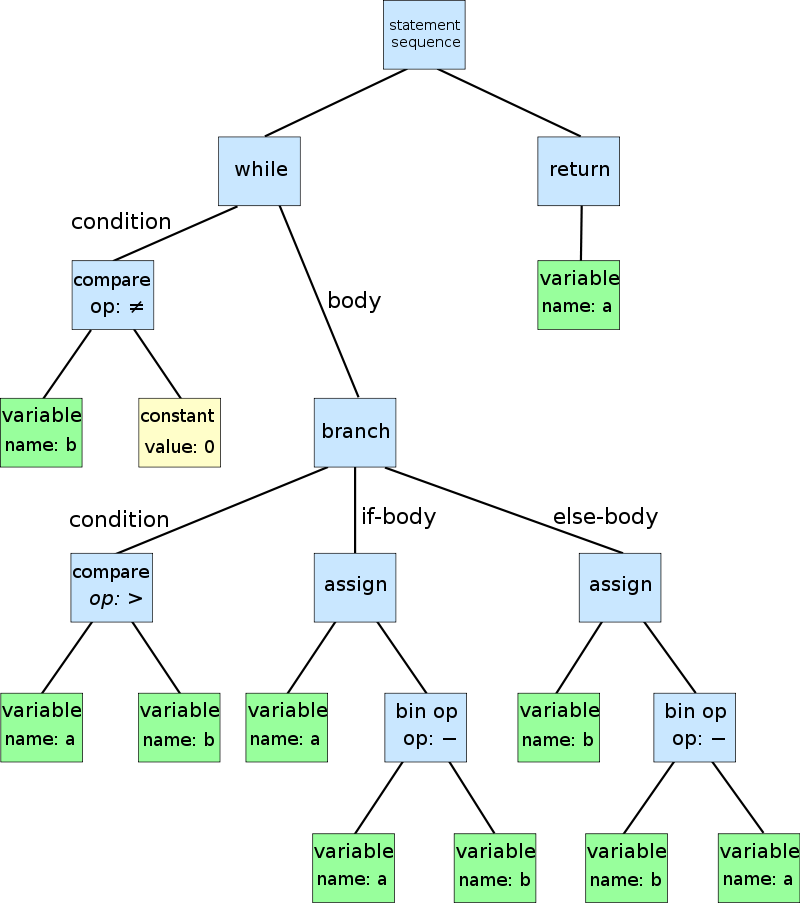
Browserify parses the AST for require() calls to traverse the entire dependency graph of your project.
AST: Abstract Syntax Tree
每一次改动都需要手动 recompile ?
No, auto-recompile.
Watch - Watchify
$ npm install -g watchify

# WATCH!
$ watchify app.js -o bundle.js -v
Build 后要如何 Debug
Source Map
# debug mode
$ browserify main.js -o bundle.js --debug
逆向所有合并、压缩、混淆!
Npm Run
$ npm run [command] [-- <args>]// package.json
{
//....
"scripts": {
"build": "browserify app.js -o bundle.js",
"watch": "watchify app.js -o bundle.js -v"
}
}Webpack - Module Bundler (2014)
transforming, bundling, or packaging just about any resource or asset Webpack For Browserify Users
Webpack For Browserify Users
# These are equivalent:
$ browserify main.js > bundle.js
$ webpack main.js bundle.js
but
// better with a webpack.config.js
module.exports = {
    entry: "./main.js",
    output: {
        filename: "bundle.js"
    }
}
Simple CLI
# make sure your directory contains webpack.config.js

# Development: debug + devtool + source-map + pathinfo
webpack main.js bundle.js -d

# Production: minimize + occurence-order
webpack main.js bundle.js -p

# Watch Mode
webpack main.js bundle.js --watch
Everything is already there!
Browserify vs Webpack
小而美 VS 大而全
- Browserify VS Webpack - JS Drama
- Comparison - Webpack
- Webpack for browserify users
- Browserify for webpack users
Is webpack just the other Browserify?
WEBPACK - LIKE A PRO webpack 特别增强篇
Motivation
- Compatibility (CommonJS, AMD, ES6...)
- Code Splitting
- Loaders & Plugins
- Development Tools & Workflow
Using Loaders
// webpack.config.js
module.exports = {
    entry: './main.js',
    output: {
        filename: 'bundle.js'
    }{,
    module: {
        loaders: [{
            test: /\.js$/,
            loader: 'babel-loader'
        }]
    }}
}
JSX Demo
Why Only JavaScript?
There are many other static resources that need to be handled
Require() Static Resources!
// Ensure the stylesheet is loaded
require('./bootstrap.css');

// get a URL or DataURI
var myImage = document.createElement('img');
myImage.src = require('./myImage.jpg');
They are part of dependency graph,包含静态资源的依赖管理
Require() Anything!
// CSS Preprocesser
require('./style.less');
require('./anotherStyle.scss');

// Compile-to-JS Language
var myModule = require('./myModule.coffee');
var myTypedModule = require('./myTypedModule.ts');
Universal Module System,对所有模块一视同仁的的依赖管理
Sass & Images
var webpackConfig = {
    module: {
        loaders: [{
            test: /\.scss$/,
            loaders: 'style!css!sass'
        }, {
            test: /\.(png|jpg|svg)$/,
            loader: 'url?limit=20480' //20k
        }]
    }}
}- Deal with CSS problems
- Inlining your images to DataURI
Using Plugins
React Hot Loader!
var config = {
    entry: ['webpack/hot/dev-server', './app/main.js'],
    module: {
        loaders: [{
            test: /\.(js|jsx)$/,
            loaders: ['react-hot', 'babel']
        }]
    },
    plugins: [
        //Enables Hot Modules Replacement
        new webpack.HotModuleReplacementPlugin(),
    ],
};
Code Splitting
split your codebase into “chunks” which are loaded on demand.
More Resources
第七日 王者归来 ES6 Module 最后的战役
TIP
There Is No Module In JavaScript! (Until ECMAScript 6)
Well...But There Is No Runtime...
Babel - JavaScript Compiler (2015)
Use next generation JavaScript, today.
Let's get into it!!
Single Default Module
// math.js
export default math = {
    PI: 3.14,
    foo: function(){}
}
// app.js
import math from "./math";
math.PI
# babel magic!
$ babel-node app.js
Named Exports
// export Declaration
export function foo(){
    console.log('I am not bar.');
}
// export VariableStatement;
export var PI = 3.14;
export var bar = foo;   // function expression
// export { ExportsList }
var PI = 3.14;
var foo = function(){};

export { PI, foo };
Importing Named Exports
// import { ImportsList } from "module-name"
import { PI } from "./math";
import { PI, foo } from "module-name";
// import IdentifierName as ImportedBinding
import { foo as bar } from "./math";
bar();  // use alias bar
// import NameSpaceImport
import * as math from "./math";
math.PI
math.foo()
"Lists"
// components.js
import Button from './Button';
import Header from './Header';

// export { ExportsList }
// Not ES6 Destructing. Not object property shorthand
export {
    Button,
    Header
}
// app.js
// import { ImportList }
import { Button, Header } from "./components";
For More Detail...
“ 习惯了就会觉得很好用的 (´Д` ) ”
Babel + browserify = Babelify
Babel + webpack = Babel-Loader
QUESTION Hey, don't be shy.